
HeatSync
ESP32 Smart Controller for Samsung Heat Pumps.
A £25 ESP32 board taps the indoor unit’s NASA bus and serves the data three ways: a phone-friendly web app, ~50 entities in Home Assistant (via MQTT or the HACS integration), and a bearer-token HTTP API. Smart hot water automatically picks the cheapest, cleanest, or warmest hour to heat the tank. Plus a heat-loss analyser and a plain-English faults catalogue. MIT-licensed, no cloud.
v0.8 and iterating. Tested on Samsung EHS Mono; more models as people install it.
Three interfaces, one device
Use it however you want.
Web app on the device
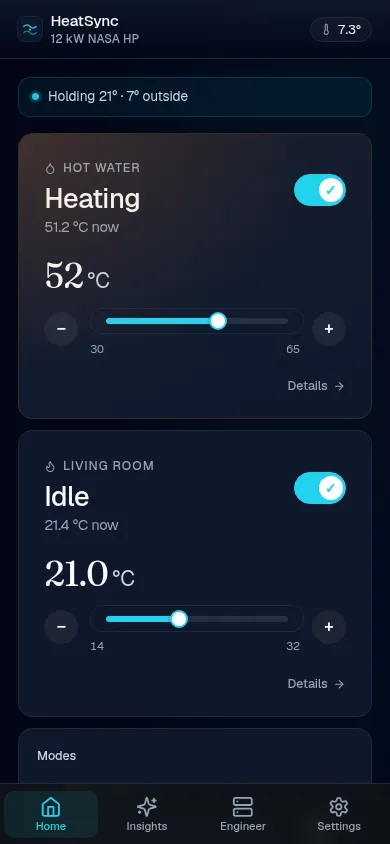
Phone-friendly UI served by the ESP32 itself. Open the device’s IP in any browser — room temp, schedule heatmap, faults catalogue, live COP. No app to install, no account to make.
Home Assistant
~50 entities surface in HA — climate, DHW, energy + cost, carbon intensity, COP, fault sensors. Either via MQTT auto-discovery (broker required, sub-second push) or the HACS custom integration (no broker, polled). Both ship the same entity set; pick one.
HTTP API
Bearer-token authenticated JSON. Same state and controls as the web app — wire it into Grafana, a custom dashboard, or a Python script that nudges flow temp based on the electricity-grid signal you trust.
Three-step setup
Quick to onboard.
Plug it in
Four wires onto your indoor unit’s terminal block — F1/F2 for the NASA bus signal, V1/V2 for the 12 V power rail — alongside the wired remote. No mains adaptor, no soldering, no opening the outdoor unit, no breaking the existing controller.
Pick your Wi-Fi
The device hosts a captive portal on first boot. Phone joins it like any guest network, picks your home Wi-Fi, sets a password. Less faff than a Sonos.
Open the dashboard
Browse to heatsync.local from any phone in the house — every sensor’s already there. Run Home Assistant? MQTT auto-discovery + the HACS integration each surface ~50 entities (climate, DHW, energy meters, fault sensor) without further setup.
Dashboard
The home screen for everyday use.
Room and outdoor temperature, hot water and heating cards with direct controls, a 24-hour weather forecast, live UK grid carbon intensity, today’s cost (split by tariff), and the week’s energy chart. Thumb-first on mobile, side-by-side on desktop. No app to install — just open the device’s IP on the Wi-Fi it’s on.
Read the dashboard tour → 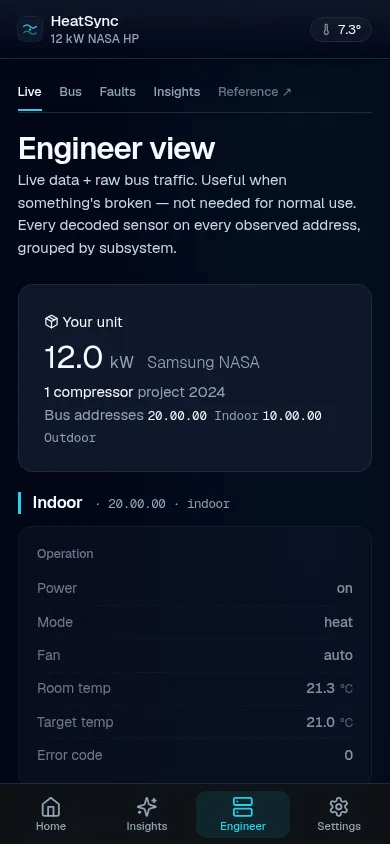
Engineer view
Every register on one page.
When something looks off, scroll past the home screen. The Engineer view groups every NASA register the indoor and outdoor units broadcast — flow temp, return, eva in/out, pump PWM, compressor frequency, EEV positions, refrigerant high and low saturation, humidity, plus the raw quiet-mode registers and the canonical “is quiet currently active” resolution. About a hundred live readings, refreshing every two seconds, no terminal needed. Useful for sanity-checking commissioning, troubleshooting unusual installs, or just satisfying the curiosity itch about what your heat pump is actually doing.
Open the live demo →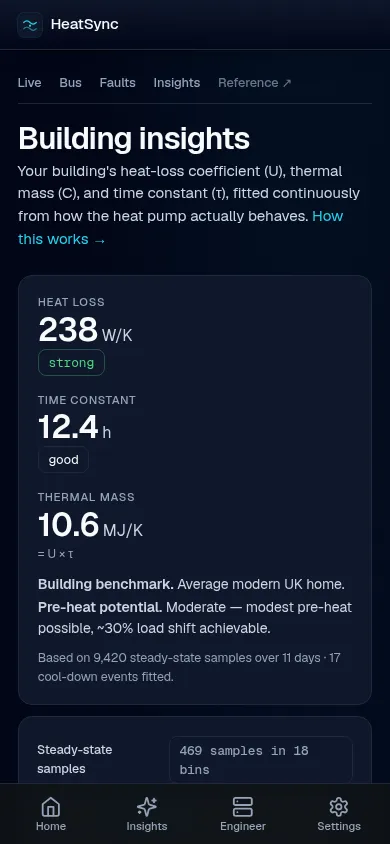
Insights
Learn how your home loses heat.
HeatSync fits a 1R1C lumped thermal model to live bus data. After a few days of steady-state samples it reports your building’s heat-loss coefficient (W/K), time constant (h) and thermal capacitance (MJ/K) — with confidence indicators that grow tighter as more data accumulates. Pre-heat smarter; tune flow temperatures with evidence, not vibes.
How the analyser works →Smart hot water
Four ways to time the tank.
Pick a mode and forget about it. Tariff heats on off-peak hours (Octopus Cosy’s three windows supported out of the box; one click to auto-detect from your Octopus account). Carbon finds the daily greenest 3-hour window from the National Grid forecast. Efficiency picks the warmest hour of the day for best heat-pump COP — a 20–30 % efficiency uplift on shoulder-season afternoons. Combo intersects the two: warmest hour that’s also off-peak. Cylinder volume + reheat time are learned automatically from observed cycles.
Smart hot water guide →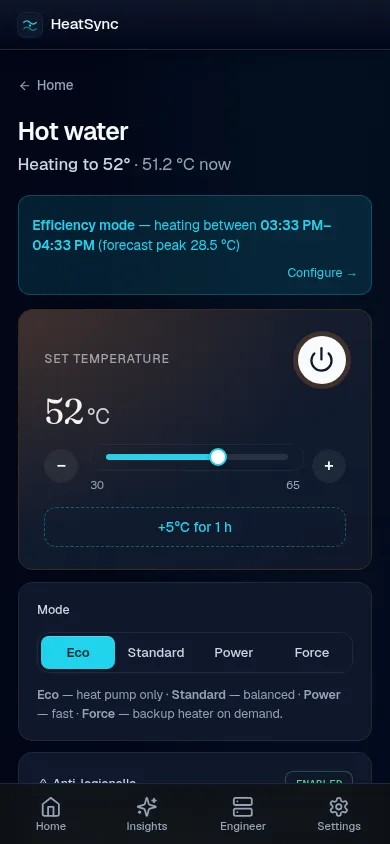
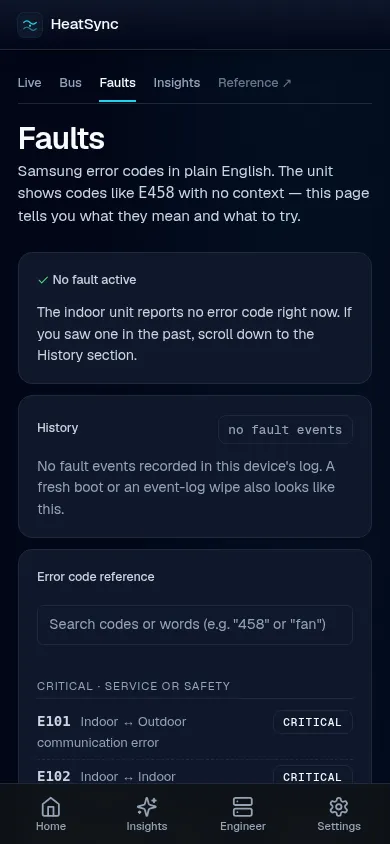
Faults
Error codes in plain English.
When the heat pump throws an E458 on the wired
remote, HeatSync tells you it’s a fan-motor protection trip and
what to check. ~35 common F-series codes catalogued from Samsung
service manuals + community work, each with a severity tag and
suggested next step. Searchable; the matching entry surfaces
automatically when a fault is live.
Hardware
Fits in a 24 mm cube.
The reference build is an M5Stack Atom S3 Lite (ESP32-S3, 8 MB flash) with an Atomic RS485 Base underneath. Four wires onto the indoor terminal block — F1/F2 signal, V1/V2 power — no separate supply, no soldering. Tested on Samsung EHS Mono ranges; deeper protocol notes live in the Hardware page.
Parts + wiring →Integrations
Plugs into whatever you already use.
The device’s web UI is fully featured on its own — no extra server needed. Already on Home Assistant? ~50 entities arrive via MQTT auto-discovery or the HACS integration. Building something custom? A bearer-token HTTP API mirrors everything for scripts, Grafana, or whichever stack you prefer.
Home Assistant guide →Concerns, addressed
Is this safe to put on my £8k heat pump?
What if HeatSync crashes or I unplug it?
Nothing changes for the heat pump. The wired remote keeps working as it always did. HeatSync listens to a non-invasive RS-485 tap and only writes when you choose to — the safety circuits, sensors and outdoor unit are untouched.
Can I run it read-only at first?
Yes — that’s the default behaviour, and the recommended way to start. Open /config/general and the “Bus writes” toggle decides whether HeatSync ever transmits. Off: it observes; you see every sensor, no risk of the device sending anything onto the bus.
Will this void my warranty?
HeatSync taps the same RS-485 bus your wired remote uses — it’s a documented Samsung accessory port. Writing back uses the same NASA protocol the remote uses. Warranty terms vary by region; in practice it’s no more invasive than fitting Samsung’s own MIM-H04EN Wi-Fi adapter. Read your installer’s paperwork if in doubt.
Will Samsung notice or lock me out?
HeatSync doesn’t touch SmartThings or any Samsung cloud. The NASA bus is wire-level; Samsung has no visibility into what’s connected unless you also fit their official Wi-Fi adapter. You’re free to run both, or just HeatSync.
What if the firmware update breaks something?
OTA writes to an inactive flash partition; the running firmware is untouched until reboot. If the new version fails to call esp_ota_mark_app_valid within 30 seconds of boot, the bootloader automatically restores the previous slot. We’ve used this rollback in anger — see the changelog.
Is my model supported?
Tested in our own homes on Samsung EHS Mono. The NASA protocol is shared across the F-series range, so other EHS variants should work read-only out of the box. Writes are model-firmware-specific — best to start read-only and watch the bus traffic, then enable writes when comfortable.
Cost in context
£25, once.
Buying a smart-thermostat add-on for your heat pump? Here’s what the same problem costs from the others on the market.
HeatSync
£25
one-off · MIT · no subscription
Samsung MIM-H04EN
£150–£220
+ installer fit · Samsung cloud
Homely
£400+
+ ~£2/mo from year 3
Havenwise
£7/mo
app-only · multi-cloud stack
Try it now, without buying anything.
The live demo is the same UI the device serves, populated with synthetic data. Click through every page; nothing’s a screenshot.
Licence and credits
Section titled “Licence and credits”HeatSync is MIT-licensed. The NASA protocol parser is vendored from
omerfaruk-aran/esphome_samsung_hvac_bus
with attribution preserved in src/nasa/UPSTREAM.md. Register
identification draws on
70p4z/samsung-nasa-mqtt
and the betaphi/NASAKit
catalogue.